Lab #7: Files
by Bill
Welcome to this week's lab excitement.
Files, and Why I'd Rather Listen To Kid Rock Than Write This Lab
We all know what a files is. It's that thing with a name on a disk.
In this week's labs, we're going to create files, access and read them. We're going to kick file ass.
But first, let's take a closer look at what, exactly, is inside a file. Truth be told, there's different kinds of files, and we're going to look at just one: a text file. This garden-variety file contains, well...text. This stuff on the screen. In fact, the web page you're reading is a text file that you just downloaded into your browser to read.
A Tale of Indirection
Well, not a very interesting tale. But a useful one, at any rate.
So far, we've written programs that read and write to (and from) the screen. But let's look at the bigger picture. From your program's perspective, it's read and writing to something. But what that thing actually is, is not important. So long as it provides a source of text when it's looking for input, and and a place to put text when it's been told to output. Where text comes from—and goes to—can be thought of as a black box.
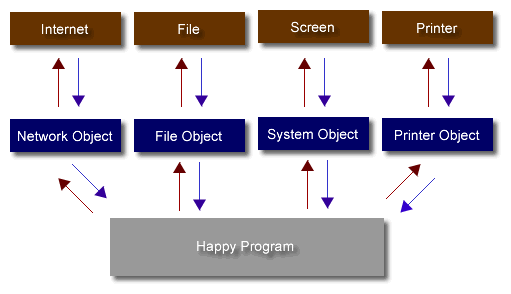
This is actually an important concept. Honest. The idea is that certain objects (say, the screen and keyboard) are actually specific instantiations of a general device (an input/output device.) As such, there are many types of devices you can read and write to. The way you do it is pretty much the same for all of them.
When you write to a device, you're really writing to an object.
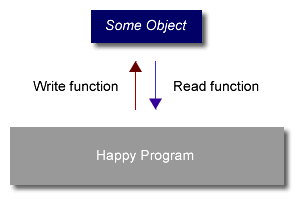
The Big Picture
If that object is the system, then the text goes to the screen:
System.out.println("Ain't life grand?");
If the class you're writing to is a file, then text ends up in a file:
MyFile.out.println("Don't make me kill you.");
("MyFile" is not part of JAVA—it's just a name that I assigned to my file object. See next section.)
Where Am I?
OK, so you can read and write text to (and from) a file with the same functions we've already been using. Super.
But actually happens to text when it gets written? How does JAVA know where to put the text in the file? Does it go after the previous text I just just wrote? And what about reading it? Where does JAVA read from when I ask it for text from a file?
The first thing to remember about JAVA, and it's associated compiler, is that they are very, very stupid. JAVA will only do exactly what it's told. When it's not told anything, it will just sit there, looking dumb. And when it's told to do something, but given only incomplete information about how to do it, it will make a lame attempt—based on some very simple (and sometimes moronic) assumptions it makes. (Actually. JAVA behaves a lot like some people I served on Student Council with.)
Every file has a two pointers—a read pointer and a write pointer. I'll talk about the write-pointer (You can extrapolate for the read one—it's the same.)
When you open a file to write, the pointer is at the beginning of the file. (If it's a new file you've just created, that's the only place it can be.) Every time you read a line from the file, the pointer moves to the next line. And JAVA remembers where the pointer is, so the next time you read from the file, it knows where to pick up. (But the pointer goes back to the beginning when you close the file.)
Where's the Beef?
And what do I actually have to type to make this work so we can all go home?
To ensure this lab isn't extra-hard, we're going to just write to a file. Specifically, we're going to create a new file, and write to it. And that's pretty much the lab.
To do this, there's some new plumbing we're going to need. To install it, type the following at the top of your source file(s):
import java.io.*; // The star means special savings!
Now that this is installed, we can use a class called PrintWriter. And there's a class derived from it called FileOutputStream, which we'll also use. (Don't worry if that doesn't make any sense—you won't need to understand that until CS102. The important thing is that we have these two classes (which are related) to deal with writing to files.)
To create a new file, type this:
MyFile = new PrintWriter(new FileOutputStream("out.txt")); // Create a new file.
This will create a new file called "out.txt"—and associate it will the MyFile Object. Anything written to the MyFile object gets written to the file associated with it. (Of course, "MyFile" and "out.txt" are uninteresting names I have chosen—you should choose your own.)
(You do, of course, have to declare "MyFile" before you assign it. I'll leave that to you.)
Can I Have Fries with That?
OK, so we've installed the right plumbing and created a new file object. Bring on the Michael Jackson TV Special.
The next question is—how do we write to the file?
MyFile.out.println("Hey, I'm filling up the hard disk!"); // Write a line of text to the file
(Note that this is exactly how we write text to the screen, except the calling object is MyFile instead System.)
When we're finished writing to the file, we need to close it. This means that the file can no longer be read from or written to by your program. This is important, because another program shouldn't read the file until you've finished writing it.
MyFile.close();
Try Hard—With a Donut
Staring the brave men and women of University Police.
I've been informed that y'all been learning about exception handling. Clark CompSci lab regulations require that we, therefore, use them.
To review briefly, exception handling is used to handle unexpected conditions (exceptions) that occur in our programs. These usually take the form of errors. To use exception handling we create try and catch blocks. It works like this:
-
Identify a section of code that may generate some errors that you want to deal with.
-
Wrap those lines of code in a try block.
-
Create catch blocks for each error you want to deal with.
-
When an error occurs inside your try block, the appropriate catch block is automatically called by JAVA. It's actually pretty sweet. Really.
In this lab, there's at least one important error we want to deal with: our new file not being created. (This could happen for a number of reasons, including, but not limited to, the fact that I designed and built our fileserver, gave it to the department, and called it Britney Spears.)
But let's talk cheddar (ICP posse in the house): wrap the statement that creates the new file in a try block. Then, create a catch block that receives the specific exception. Now you'd think that this exception would have name that makes sense—like, say..."FileNotFoundAndCouldNotBeCreated." But the good folks at Sun felt that "FileNotFoundException" was good enough. Of course it's plain goofy to call the exception that, because the name isn't necessarily true. But, like Operation Enduring Freedom, we're stuck with it.
And how should you handle this error? Well, consider that this is a catastrophic error, like...a remake of the Lethal Weapon movies staring Sinbad (in Danny Glover's role), Pauly Shore (Mel Gibson's) and Carrot Top (Joe Pesci's). In both cases, you want to bail. The catch block should therefore write some sort of error message to the screen and then quit.
What the #$@% is the Assignment?
Glad you asked.
The assignment is to modify the Playlist program so that when the user quits, the playlist gets written to a text file.
You should implement this by creating a new method in the Song class, called "SaveSong." It will write the contents of the song to a file.
In your main, you should create the file objection. Then, have a for-loop that goes through the array, calling SaveSong for each entry.
But how does each Song get written to the same file? To do that, we need to make sure that each time we call SaveSong, it uses the same PrintWriter object ("MyFile"—that we created in main). The easiest way to do this is to pass a reference to "MyFile" to the SaveSong method. So the signature for SaveSong would be:
public void SaveSong (PrintWriter TheFile)
Some questions to think about:
- Why is this method declared public?
- Why doesn't it need to return any variables?
You can then view the file by just clicking on it on the desktop. A sample output might look like this:
|
Playlist for the ROCU, the Radio of Clark University
Title: "Who We Be"
Artist: DMX
Paid Slots: 5
Use Slots:4
Title: "Chop Suey!"
Artist: System of a Down
Paid Slots: 7
Use Slots:7
Title: "The Coming Dawn"
Artist: Kerry Livgren
Paid Slots: 450
Use Slots:0
Title: "Carry On Wayward Son"
Artist: Kansas
Paid Slots: 6
Use Slots:4
Title: "Somebody Help Me"
Artist: Big Train
Paid Slots: 5
Use Slots:5
|
Conclusion